
Google has a tool that will turn your spoken dialogue into written text on Google tools. This can help ALL grade levels.
Ways to Use this Tool:
– ESL Students who can speak English (not write) can communicate in a written way
– Anecdotal note-taking for behavior tracking
– Record student’s spoken explanations
How it Works:
Open a document in Google Docs.
Click the “Tools” button: Voice typing. …
When you’re ready to speak, click the microphone that pops up on the left side of the page. Speak clearly, at a normal volume and pace.
To end the voice typing, simply click on the red microphone again.
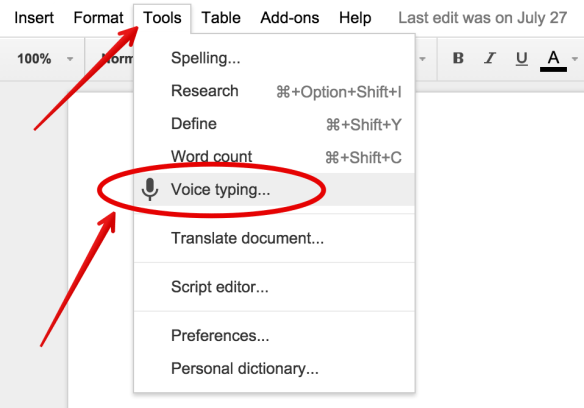
Here’s an article explaining more (and image source).
 I’m pretty fond of this new Don’t Eat Pete board (updating my collection here!). I think it turned out nicely, so I wanted to share with you! Perfect for any St. Patrick’s Day party, this would work perfect with Lucky Charm cereal or rainbow Skittles for the treats!
 Squarehead Teachers